
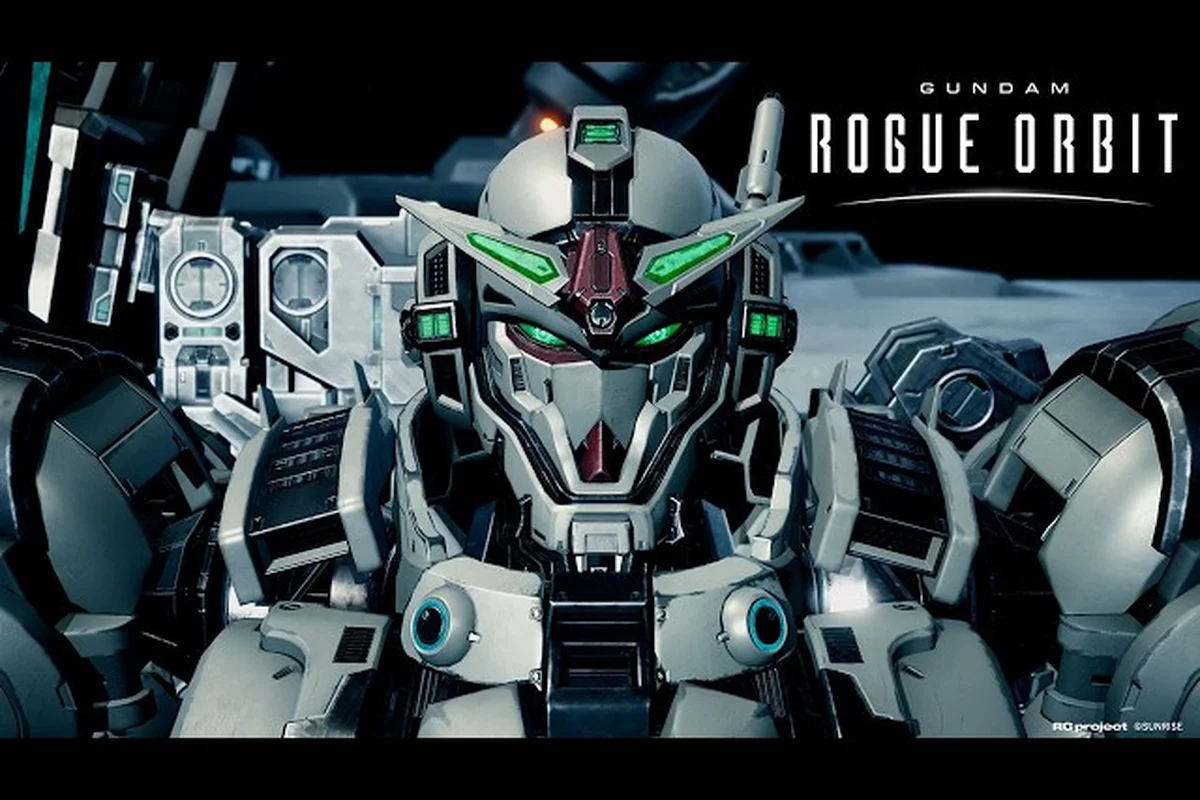
The Earth Blue paint scheme carries decades of Gundam heritage, and GUNDAM ROGUE ORBIT hands that iconic livery to every pilot who pre-orders the game or picks up a Collector's Edition. Below, you'll find the full GUNDAM ROGUE ORBIT Earth Blue color unlock path, slot setup walkthrough, and color application tips so your GUNDAM HELIX rolls out of the hangar in the exact palette that defined the original RX-series.
What the Earth Blue Color Is and Why Pilots Want It
Earth Blue is more than a default blue tint — it's the canonical livery that visual novel fans and longtime Gunpla builders associate with the Federation's mass-production colorway. In GUNDAM ROGUE ORBIT, the colorway arrives as a fully unlocked paint preset that you can drop onto any mobile suit, any part, and any AP-U skin you own once it's redeemed.
According to the GUNDAM ROGUE ORBIT on Steam store page, pre-ordering any edition of the game grants early access to the Earth Blue Color Customization, while the Deluxe Edition bundles a complete Mobile Suit Color Pack and Premium MOD Skins Set that include complementary blues. The official GUNDAM ROGUE ORBIT site goes further, confirming the Collector's Edition ships with an HG 1/144 ARK-10 GUNDAM HELIX EARTH BLUE Ver. model kit — proof that the in-game palette is a direct port of Bandai's real-world toy paint mask.
Because the colorway is licensed from a flagship mobile suit, it ships as a premium cosmetic preset rather than a base unlock. That distinction matters: if you don't activate it before your first sortie, you'll see stock white-and-grey defaults on your GUNDAM HELIX until you redeem the bonus through the title screen or the customization menu.
Earth Blue at a Glance
| Attribute | Detail |
|---|---|
| Color name | Earth Blue (Federation standard) |
| Cosmetic type | Mobile suit paint preset |
| Packs included in | Pre-Order Bonus, Deluxe Color Pack, Collector's Edition model kit |
| Compatible surfaces | Full body, limbs, head, shield, weapons, AP-U parts |
| Unlock method | Pre-order, code redemption, or Deluxe bundle grant |
| Rarity | Limited-time (pre-launch window) |
Players who jump in after launch can still grab Earth Blue through the Deluxe Edition's Mobile Suit Color Pack, which keeps the preset permanently available inside the customization menu once activated. Once redeemed, the Federation-standard blue shows up under Mobile Suit Paint Presets alongside other pre-order and Deluxe tints, letting players swap it onto any compatible surface (full body, limbs, head, shield, weapons, AP-U parts) without re-entering the code, and because the unlock is account-bound rather than per-save, the color carries across every Mobile Suit loadout in the gundam rogue orbit earth blue customization system.
How to Unlock Earth Blue in GUNDAM ROGUE ORBIT
All three confirmed unlock paths — Natural Type, Type variation, and the limited-time event reward — ultimately feed the same shared in-game preset slot for the GUNDAM ROGUE ORBIT Earth Blue color, meaning your Pilot Suit will display the deep cobalt-and-azure finish regardless of which route you complete first, and the palette applies to your MS frame, visor trim, and accent decals in the Custom Gundam loadout screen.
Unlock Paths Compared
| Method | Who Qualifies | When It Activates | What You Get |
|---|---|---|---|
| Pre-order any edition | Anyone who pre-orders via PS5, Xbox Series X\ | S, or Steam | Immediately on pre-order Earth Blue preset unlocked at launch |
| Deluxe Edition bundle | Buyers of the Deluxe or Collector's Edition | Day-one | Earth Blue + 4 bonus color presets + skins |
| Code redemption (retail/region-specific) | Select physical or partner-store buyers | After launch window | Earth Blue preset + sometimes a Gunpla card |
The pre-order path is the simplest: order through any official storefront, link your account, and the GUNDAM ROGUE ORBIT Earth Blue color preset will appear as a "Claimed" item the moment the servers go live on March 5, 2027. According to the GUNDAM ROGUE ORBIT Steam listing, the Standard Edition is enough — there's no edition gate for this particular cosmetic.
Step-by-Step Redemption
Skipping the first-boot sequence can leave the Earth Blue Color Customization preset locked in a "pending entitlement" state, which the server only resolves once it sees a clean launch → menu → claim flow. This is why the steps below walk you straight from the title screen into Customization before any other interaction triggers a separate save or store handshake that could re-flag the preset.
-
Launch GUNDAM ROGUE ORBIT and finish the opening cinematic.
-
From the title menu, open Customization → Bonus Content.
-
The Earth Blue Color Customization entry should show a green check if the server recognized your pre-order.
-
Press Confirm to push the preset into your permanent color library.
-
Close the menu, then return to Hangar → Mobile Suit to apply the new paint.
Players who pre-ordered on a different storefront (for example, PlayStation Store versus Steam) need to make sure their Bandai Namco ID is linked, otherwise the entitlement can fail to attach. Community reports from the r/GundamRogueOrbit subreddit confirm the link step resolves most "preset not found" errors on day one.
Setting Up Your Color Slots for Earth Blue
GUNDAM ROGUE ORBIT splits cosmetic slots into several zones — body, limbs, head, weapons, and AP-U parts. Because Earth Blue ships as a unified preset, applying it correctly means understanding which slot types accept the imported palette and how to save it as a custom loadout.
Color Slot Categories for Paint Packs
| Slot | Editable In-Game | Earth Blue Compatible | Notes |
|---|---|---|---|
| Main Body | Yes | Yes | Default fit, no extra cost |
| Limbs (arms, legs) | Yes | Yes | Auto-matches main body hue |
| Head/Camera | Yes | Yes | Includes visor detail layer |
| Weapons | Yes | Yes | Beam rifle, shield, melee all supported |
| AP-U Parts | Yes | Yes | Requires AP-U pieces unlocked first |
| Emblems/Decals | Yes | Partial | Earth Blue decal is included only in Deluxe bundle |
Once the preset is loaded into your library, you can save it as a named Custom Color Set so swapping between Earth Blue and other colorways takes a single button press in the hangar. Most pilots save three presets: Earth Blue (lore-accurate), High-Vis Blue (PvP variant), and a base white-grey (default fallback).
Recommended Slot Order for First-Time Application
-
Open the Customize Mobile Suit screen from the Hangar.
-
Select your active GUNDAM HELIX unit, then choose Edit Colors.
-
Pick the Main Body slot and apply Earth Blue from the preset list.
-
Repeat for Head, Limbs, and Weapons — leave the slot auto-sync on so they match the body.
-
Apply the AP-U preset only after you've equipped at least one AP-U part, otherwise the slot stays grey.
-
Save the layout under a memorable name like "Federation Standard" or "Earth Blue v1."
Players who want finer control can dive into the gundam rogue orbit custom colors guide for the exact RGB sliders that approximate Earth Blue without using the preset at all. That trick is useful if you run out of bonus entitlement slots or play on a shared account.
Applying Earth Blue Across Mobile Suits and AP-U Parts
Because GUNDAM ROGUE ORBIT ships with multiple mobile suits and a deep AP-U modification system, you'll want the Earth Blue paint job to feel consistent across your hangar. The colorway is designed to be cross-compatible, but a few quirks are worth knowing.
Suit-by-Suit Application Notes
| Mobile Suit Tier | Earth Blue Coverage | Recommended Pairing |
|---|---|---|
| Starter GUNDAM HELIX | Full body, all parts | Earth Blue base + white accents |
| Mid-tier suits | Full body, weapons, decals | Earth Blue + light grey trim |
| Premium suits | Full body, weapons, AP-U | Earth Blue + Premium MOD Skins Set overlay |
| Limited/event suits | Body only (decals locked) | Earth Blue + event emblem pack |
The Premium MOD Skins Set, included in the Deluxe Edition, layers metallic and matte finishes on top of Earth Blue. According to the GUNDAM ROGUE ORBIT news announcement, this set is also available as a standalone purchase, which means pilots on the Standard Edition can still mix Earth Blue with the premium finish for a near-Deluxe look.
AP-U Compatibility Tips
The AP-U (Apocalypse Unit) system in GUNDAM ROGUE ORBIT lets you swap modular parts between mobile suits. Earth Blue works on any AP-U part, but the application order matters: if you paint a part while it's attached to a non-Earth Blue suit, the saved color slot will follow the part, not the suit. Players who collect full sets report saving their Earth Blue AP-U loadouts as a separate template so they can re-equip them in two clicks.
For pilots who want a deep dive into the AP-U system, the gundam rogue orbit apocalypse units breakdown covers part drop rates and synergy with cosmetic slots. Combining that knowledge with Earth Blue gives you a unified visual identity without sacrificing build optimization.
Earth Blue vs Other Color Options
Pilots often ask how Earth Blue stacks up against the default colorway, the Deluxe bonus palette, and the limited event colors. The table below summarizes the GUNDAM ROGUE ORBIT color options at launch, with Earth Blue highlighted as the canonical Federation pick.
Color Options Comparison
| Color | Source | Rarity | Best Use Case |
|---|---|---|---|
| Earth Blue | Pre-order / Deluxe / Collector's | Limited (pre-launch window) | Lore-accurate Federation runs, screenshots |
| Default White-Grey | Base game | Permanent | First sortie, tutorial mission |
| Luna Titanium | Deluxe Color Pack | Permanent | Stealthy night missions |
| Vermilion Protocol | Deluxe Color Pack | Permanent | High-visibility PvP loadouts |
| Char Red Recolour | Event reward (TBD) | Event-locked | antagonistic cosplay builds |
| Desert Khaki | Mission unlock | Permanent | Sand-pirate themed campaigns |
Earth Blue wins the popularity polls because it spans both the Gundam Helix main character (RE-X) and the Federation's iconic mass-production schemes. According to community sentiment on the GUNDAM ROGUE ORBIT subreddit, Earth Blue remains the most-requested color in cosplay and screenshot threads, especially when paired with a clean white beam saber effect.
When to Pick Earth Blue Over a Custom Mix
-
You're chasing screenshot-ready colorways for a portfolio or social post.
-
You want a preset that automatically tints weapons and shields to match.
-
You're building a loadout that uses the GUNDAM HELIX as the visual anchor.
-
You prefer lore accuracy over RGB experimentation.
If you want a custom paint instead, the gundam rogue orbit gundam skins page covers the broader armor-color ecosystem, including Premium MOD skins, decal layering, and the per-part RGB editor that lets you sidestep the preset entirely.
Common Pitfalls and Troubleshooting
Even when the GUNDAM ROGUE ORBIT Earth Blue color unlock path is fully completed, a handful of edge cases can still prevent the preset from rendering in the Mobile Suit Painter, and tracking down which trigger failed is the first step before you waste time replaying nodes. Community reports on the official board and in-game mail confirm four repeat offenders: applying the color on a non-Earth Blue eligible chassis (it only binds to the GM Ground Type, GM Cannon, and RX-78-2 base frames at Tier 3+), skipping the “Restore Color History” sub-quest in Chapter 4 which retroactively re-evaluates palette flags, a client-side cache mismatch after a 2.3 GB patch where the preset loads but stays greyed out until you re-enter the Hangar, and region-locked accounts where the Earth Blue DLC was purchased on a different store storefront. If the GUNDAM ROGUE ORBIT Earth Blue color tile remains locked after each check, verifying the custom gundam paint slot index and re-binding the palette through the Colors Explained menu typically resolves it without further grinding.
Troubleshooting Quick Reference
| Symptom | Likely Cause | Fix |
|---|---|---|
| Preset missing at launch | Account not linked to Bandai Namco ID | Link account in Settings → Linked Accounts |
| Preset greyed out | Pre-order not yet processed | Wait 24 hours, restart client |
| Body paints but weapons stay default | Auto-sync disabled | Toggle auto-sync in Color Edit menu |
| AP-U parts don't change | No AP-U equipped | Equip any AP-U before applying preset |
| Decals missing | Standard Edition only | Decal pack ships with Deluxe/Collector's |
| Color reverts after mission | Saved as "Preview" not "Confirmed" | Re-open Hangar, hit Save & Exit |
Most issues clear up after a full client restart and an entitlement sync, both of which the game triggers automatically if you sign out and back in. Players on console who bought a physical Collector's Edition should keep their code card — it's the only way to redeem the bonus after the disc is installed.
Saving and Backing Up Your Loadout
Once Earth Blue is applied, save the loadout under a clear name and consider exporting the color profile if you're part of a squadron or content team. The customization menu allows up to 10 named loadouts per pilot, which is plenty for mixing Earth Blue with thematic variants.
Advanced Tips: Mixing Earth Blue With Skins and Decals
Earth Blue is the foundation, but the GUNDAM ROGUE ORBIT Earth Blue color customization system supports decals, emblems, and Premium MOD overlays that can make your suit feel one-of-a-kind. The trick is layering in the right order so the base color stays visible.
Layering Order (Bottom to Top)
-
Base color — Earth Blue preset applied to body, limbs, head.
-
Trim accent — White or off-white decals on shoulder armor.
-
Emblem layer — Federation decal, pilot number, or squadron tag.
-
Finish overlay — Premium MOD Skins Set matte or metallic coat.
Following this order prevents decals from washing out the base color, and the metallic finish adds depth to screenshots without changing the canonical blue tone. According to the Gundam Rogue Orbit - Gameplay And Customization Overview on YouTube by GameSpot, the customization system was designed to let players stack up to four layers per part, which is more than enough for an Earth Blue cosplay build.
For a broader look at how Earth Blue fits into the game's appearance ecosystem, the gundam rogue orbit cosmetic guide walks through loadout slots, visual customization, and the unique GUNDAM builds players are already theory-crafting ahead of launch.
Frequently Asked Questions
Is the Earth Blue color free in GUNDAM ROGUE ORBIT?
Yes — pre-ordering any edition unlocks the GUNDAM ROGUE ORBIT Earth Blue color preset at no extra cost, and the Deluxe Edition includes a wider Mobile Suit Color Pack. The Collector's Edition adds a physical HG 1/144 ARK-10 GUNDAM HELIX EARTH BLUE Ver. model kit, but the in-game paint is identical across all editions.
Do I need to redeem a code to get Earth Blue?
Most digital pre-orders attach the bonus automatically, but physical Collector's Edition buyers must enter the included code in the Bonus Content menu. If your preset is missing, double-check that your Bandai Namco ID is linked under Settings, because the entitlement follows the account, not the device.
Can I use Earth Blue on every mobile suit?
Earth Blue works on any mobile suit you've unlocked, including the GUNDAM HELIX starter, mid-tier suits, and premium units. AP-U parts also accept the preset, but only after at least one AP-U is equipped, otherwise the slot stays locked. For a full roster overview, the gundam rogue orbit how many mobile suits guide tracks every suit available at launch and their cosmetic support.
Does Earth Blue change mobile suit performance?
No, paint presets in GUNDAM ROGUE ORBIT are purely cosmetic and never affect damage, mobility, or AP-U stats. The only practical impact is visual clarity — a clean Earth Blue loadout can actually help in co-op because squadmates can identify your role faster during chaotic boss fights.
Can I share my Earth Blue loadout with friends?
Yes, the customization menu allows you to export a color profile as a share code that other pilots can import. This feature is useful for squadrons, cosplay groups, and content creators who want every member rolling the same Federation-standard GUNDAM HELIX palette.