
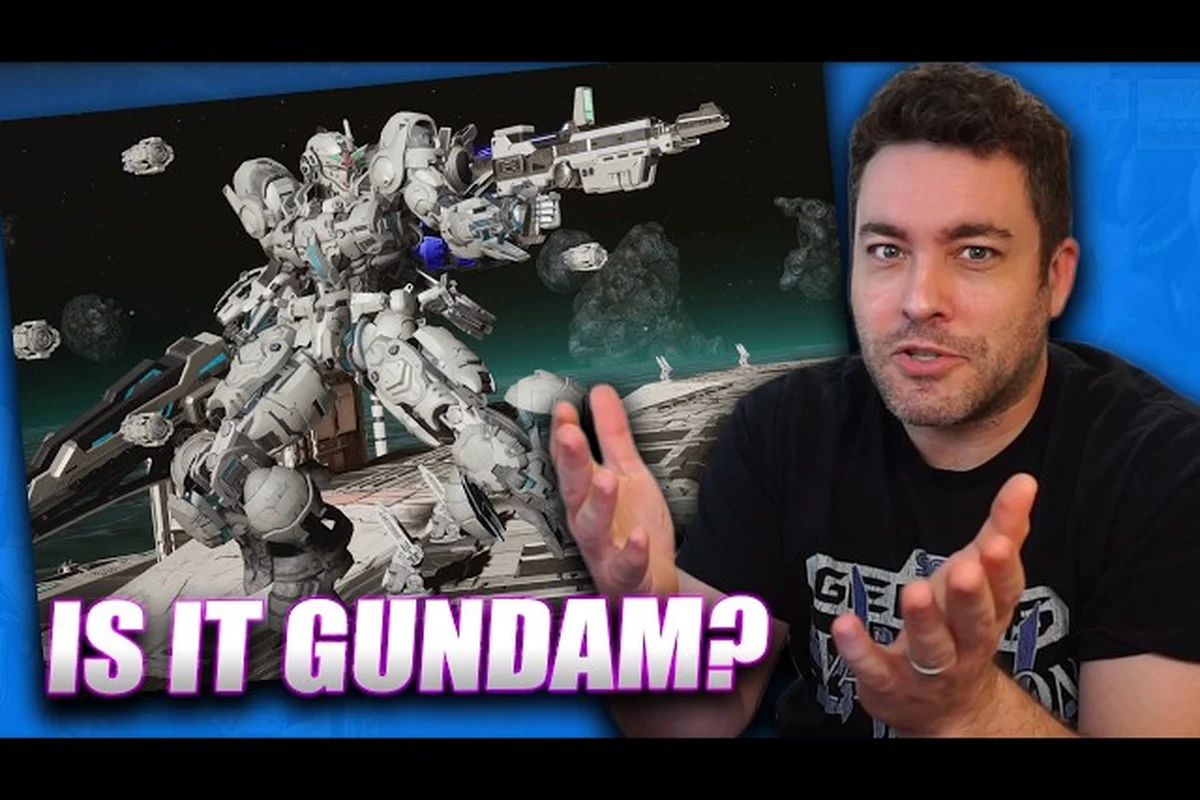
Jumping into a new mobile suit without a plan is the fastest way to scrap your first sortie, so this GUNDAM ROGUE ORBIT tips primer hands new pilots the controls, combat fundamentals, and early-mission habits that actually matter. Bandai Namco's high-mobility mecha action game lands March 2027 on PC and console, and a quick gundam rogue orbit 101 pass now means you will spend launch day running missions instead of rereading tooltips. Players who front-load the basics always climb the learning curve faster because the opening hours are where every system — boost, lock-on, MODs, support assist — stacks on top of the previous one.
Getting Familiar With the Cockpit: Controls and Movement
The first pillar of any solid gundam rogue orbit tutorial is the control layer, and the game hands you a fluid one once you stop fighting it. You pilot ace pilot RE-X inside the Gundam Helix, a high-mobility mobile suit built around fast vertical play rather than the slow, armored duels of older mecha sims. According to the official GUNDAM ROGUE ORBIT website, the suit is paired with Vii, a Haro unit that functions as a general-purpose intelligent assist, so the action always feels like a two-character duet even when you are running solo.
Default Control Map at a Glance
The table below summarizes the default bindings new pilots should memorize before their second mission. DualSense and DualShock controllers are officially supported, so most of this maps cleanly to a gamepad; keyboard defaults are lighter and worth rebinding in Settings.
| Action | Gamepad (Default) | Keyboard (Default) | Practical Use |
|---|---|---|---|
| Main Boost | L2 / LT | Shift | Long-range repositioning and chase windows |
| Quick Boost | B / Circle | Space | Short evasive dash, resets on cooldown |
| Fire Primary | R2 / RT | Left Mouse | Beam rifle, machine cannon, current ranged weapon |
| Lock-On Toggle | R1 / RB | Q | Snaps reticle to nearest threat inside lock cone |
| Melee / Shield Bash | Square / X | F | Closes distance, staggers light enemies |
| Support Assist (Vii) | Triangle / Y | E | Calls Haro unit for healing, hacking, or stagger help |
| MOD Activate | D-Pad Up | 1–4 keys | Trigger equipped field modifications mid-mission |
Why Boost Management Is the Heart of Combat
Boost is your single most important resource because it powers every escape, every chase, and every positioning reset. The Main Boost burns faster but covers long distances, while Quick Boost is your panic button — short, i-jump-style bursts that refresh on a short cooldown. New players who treat Quick Boost as a "get out of jail free" card tend to survive the first three missions; new players who spam it die the moment a sniper joins the engagement.
A useful habit is the boost discipline loop: engage with Main Boost, fire a controlled burst, reset distance with Quick Boost, and only re-engage when your gauges are at 70% or higher. The same loop doubles as your melee opener, because charging in with a stale boost gauge is how you eat a counter-stagger and lose 40% of your armor in a single frame.
Core Combat Basics: Lock-On, Ranged, and Melee
Combat in GUNDAM ROGUE ORBIT is split into three clean layers, and learning when to switch between them is what separates a passable run from a clean one. The first layer is ranged pressure with the beam rifle or machine cannon, the second is lock-on assisted fire for groups of mobile armor, and the third is melee for stagger and break windows. The community has already noted in the GameSpot gameplay overview on YouTube that the system rewards a "ranged poke, dash in for melee, dash out" rhythm rather than face-tanking, which lines up with how Bandai Namco's mecha design has trended since the 2020s.
Ranged vs. Melee vs. Assist: A Quick Comparison
| Combat Style | Best Against | Risk | When to Use |
|---|---|---|---|
| Ranged Pressure | Turrets, snipers, kiting enemies | Runs dry on ammo if you spam | Open engagement, before enemy shields break |
| Lock-On Burst | Groups, swarms, flying armor | Locks break if target leaves cone | Multi-target rooms, escort missions |
| Melee Combo | Staggered suits, broken shields | Punished hard by un-staggered elites | After Support Assist staggers a target |
| Support Assist (Vii) | Tough elites, healing windows | Long cooldown, telegraphed | Once per skirmish, on the priority target |
Reading Enemy Telegraph Cues
Every enemy in the game telegraphs their big attack roughly one to one and a half seconds before it lands, and that window is your cue to Quick Boost sideways, not backward. Sideways dodges are safer because they keep your reticle on the threat so you can punish the recovery animation. Backward dodges feel safer but they break your firing line and let ranged enemies reset, which is how a clean fight turns into a war of attrition.
The Gundam Helix, RE-X, and Your Support Squad
The narrative backbone of the game is a small but well-defined cast, and the GUNDAM ROGUE ORBIT 101 walkthrough benefits from knowing who is actually in the cockpit next to you. You play as ace pilot RE-X, the Vanguard commander of the Gundam Helix, and the supporting crew members each shape how a mission plays out tactically. The launch roster includes Sofia, a mysterious young woman with a hidden agenda; April, captain of the Stellarvane; Big Paul, leader of the sand pirates; and Elaine, the knight commander introduced alongside the rest of the cast in the official Bandai Namco announcement.
Squad Roles at Launch
| Character | Role | How They Show Up in Combat |
|---|---|---|
| RE-X | Player pilot, Gundam Helix | Main character, ace-tier reactivity |
| Vii | Haro unit, support AI | Passive heals, hack nodes, stagger help |
| April | Captain, Stellarvane | Mission dialogue, squad commands, supply drops |
| Sofia | Mysterious ally | Story-driven assists, occasional co-op sync attacks |
| Big Paul | Sand pirate leader | Faction missions, optional rival duels |
| Elaine | Knight commander | Mid-game unlock, brings heavy-armor co-op synergy |
Customization and Editions
According to the GUNDAM ROGUE ORBIT Steam page, the Standard and Deluxe editions both ship with access to Mobile Suit Color Pack and Premium MOD Skins Set, while Deluxe adds the Mission Reward Booster and a digital artwork and music selection. The Launch Edition adds physical goodies like a reversible cover and 11x17 poster, and the Collector's Edition bundles an HG 1/144 ARK-10 GUNDAM HELIX EARTH BLUE Ver. model kit. Pre-Order Bonus currently grants early unlock of the Earth Blue Color Customization, which is purely cosmetic but worth noting for collectors.
If you want a deeper look at the broader launch roadmap and how each squad member factors into the meta, the GUNDAM ROGUE ORBIT meta guide breaks down the long-term progression picture in detail.
MODs, Loadouts, and Pre-Mission Prep
The MOD system is where new pilots waste the most time, because the temptation to swap gear between every mission is strong and the payoff for sticking to a build is much higher. MODs are field modifications you slot before deployment, and they range from passive stat boosts to active abilities triggered by the D-pad. The Mission Reward Booster from the Deluxe edition is itself a MOD-style effect, so the build economy is broader than it first appears.
Starter Loadout Decision Matrix
| MOD Slot | Defensive Pick | Offensive Pick | Hybrid Pick |
|---|---|---|---|
| Slot 1 (Passive) | Barrier Regen + | Magazine Size + | Heat Dispersion + |
| Slot 2 (Active) | Emergency Repair | Overcharge Beam | Shield Bash+ |
| Slot 3 (Passive) | Sensor Range + | Crit Damage + | Boost Recovery + |
| Slot 4 (Active) | Vii Recall | Rocket Swarm | Hacking Pulse |
A defensive loadout is the safest gundam rogue orbit walkthrough choice for the first three missions because the game is still teaching you enemy patterns. Once you reach the fourth mission, switch to hybrid and start learning when Overcharge is worth more than Barrier Regen. Pure offensive is fun but punishing, and it really only pays off once you can read telegraphs instinctively.
Pre-Mission Checklist
-
Confirm your Main Boost and Quick Boost cooldowns are visible on the HUD.
-
Re-equip at least one ranged and one melee MOD so you are not stuck in one style.
-
Check your support assist cooldown — sending Vii out at the wrong time is the most common new-pilot mistake.
-
Rebind Lock-On Toggle if the default feels clunky; this single key handles 40% of your combat flow.
-
Skim the mission briefing for elite warnings, because they dictate whether you bring stagger tools or barrier tools.
Once your pre-mission checklist is dialed in, the next step is understanding how loadout choices compound across a full run in GUNDAM ROGUE ORBIT — early weapon picks and pilot passive slots dictate whether missions 4 through 10 snowball into a power curve or force a respec at the orbital dock. The GUNDAM ROGUE ORBIT intro guide breaks down those first ten missions mission-by-mission, including which MOD swaps to prioritize after the Mission 3 boss drops the Voltaic Frame and how stagger-window timing shifts once elite Vii sync rates climb past 60%.
Mission Flow, Co-op, and the First Ten Hours
Mission structure in GUNDAM ROGUE ORBIT is built around short, high-intensity sorties that last roughly 8 to 12 minutes each, with a clear objective, two or three sub-objectives, and a debrief back on the Stellarvane. According to the Steam app details listing, the game ships with single-player, multi-player, co-op, and online co-op, plus Steam Achievements, so you are never locked into a solo grind. Co-op is where the assist system really opens up, because one player can specialize in stagger while the other focuses on damage.
Solo vs. Co-op Comparison
| Play Style | Pacing | Difficulty | Best For |
|---|---|---|---|
| Solo | Slower, more methodical | Higher per-room pressure | Learning patterns, story-first runs |
| 2-Player Co-op | Medium, role-divided | Easier trash, harder elites | Testing builds, farming missions |
| Online Co-op | Variable, network-dependent | Patch-dependent | Late-game farming, MOD hunts |
Common Mistakes on Day One
-
Spamming Quick Boost into walls and eating free damage while recovering.
-
Forgetting to toggle Lock-On in tight rooms where it actively gets in the way.
-
Using Support Assist at the start of a fight instead of saving it for the elite.
-
Standing in one spot while the boss charges a telegraphed AoE.
-
Selling early MODs for credits before you understand which passives stack.
The companion GUNDAM ROGUE ORBIT beginner guide pairs well with this mistake list because it walks through the first ten hours mission-by-mission, covering Lock-On toggle timing in tight rooms, the Support Assist window you want to keep for the elite phase, and how to read telegraphed boss AoEs like the Charged Slam so you can reposition before the red ring resolves. It also breaks down which early MODs actually stack multiplicatively versus which look tempting but are vendor bait, so you stop burning credits on passives you will replace within two shifts.
Launch Readiness and Final Prep
Pre-launch, the smartest move you can make is a quick gundam rogue orbit tutorial pass on the official announcement trailer so the visual language of the game is already familiar when you boot the campaign. The official announcement trailer on YouTube shows the action cadence, the visual style, and the way Vii triggers in the middle of combat. Once you have that baseline, the in-game tutorial missions will land twice as fast.
A short pre-launch checklist keeps nerves in check on day one: with Vii's pilot swapping, beam rifle cooldowns, and orbital movement all hitting at once, a written pass through the Boost → Melee → Vii Trigger loop before logging in means the muscle memory is already half-built when the title screen fades into the first mission. This is one of those gundam rogue orbit tips that costs five minutes the night before and saves an entire first run of fumbling through control prompts mid-combat.
-
Verify your platform: PS5, Xbox Series X|S, or Steam — preorder bonuses are platform-locked.
-
Confirm your edition, because Deluxe owners get the Mission Reward Booster active immediately.
-
Rebind Lock-On, Boost, and Melee to whatever feels natural on your preferred input.
-
Decide your first co-op partner, because starting in co-op is dramatically easier than starting solo if both of you are new.
-
Keep one save slot free for the early-game decisions that may carry over.
For a more thorough pre-release primer that covers everything you should know before March 2027, the GUNDAM ROGUE ORBIT how to get started guide is the broadest read on the site. With those fundamentals locked in, the rest of your first session becomes a matter of practice, not guesswork.
Frequently Asked Questions
What is the best starting MOD loadout for new pilots?
A defensive hybrid is the safest opening build: pair Barrier Regen + with Emergency Repair for survivability, then add Sensor Range + so you see enemies before they see you. Save offensive MODs like Overcharge Beam until you reach the fourth mission, when enemy patterns become predictable enough to risk trading barrier uptime for damage.
Should I play GUNDAM ROGUE ORBIT solo or in co-op at launch?
Both work, but co-op is friendlier for your first run because the Support Assist cooldown is shared and one player can specialize in stagger while the other focuses on damage. Solo is harder per room but better for learning telegraphs at your own pace, and the game supports both without locking any content behind multiplayer.
How long does a typical mission take?
Most sorties run between 8 and 12 minutes depending on objective density, and elite rooms can push a single mission closer to 15 minutes if you are still learning patterns. Expect your first three missions to take 18 to 20 minutes each because the game intentionally slows you down while it teaches lock-on discipline and boost management.
Do pre-order bonuses carry over to co-op?
Yes, the Earth Blue Color Customization from the Pre-Order Bonus and the Mission Reward Booster from the Deluxe edition both apply to your account across solo and co-op play. Color packs and MOD skins are cosmetic and do not affect balance, but the Mission Reward Booster is a passive that quietly improves your drop rate in every game mode.
What controller works best for GUNDAM ROGUE ORBIT?
The DualSense is officially supported and most community testing points to it as the most comfortable default because the trigger resistance maps cleanly to the Main Boost and Fire Primary inputs. Xbox controllers work identically, and keyboard plus mouse is viable once you rebind Lock-On to a mouse button rather than a key, because the toggle is pressed too often to live on a standard Q or E bind.